
Rysflo Metabolism 1.0
Instructions for Use
Rysflo™ is a handheld breath analysis device designed to measure specific breath biomarkers and provide metabolic wellness insights through the Rysflo mobile application. Please read this manual carefully before using the device and keep it for future reference.
What's in the Box
| No. | Component | Description |
|---|---|---|
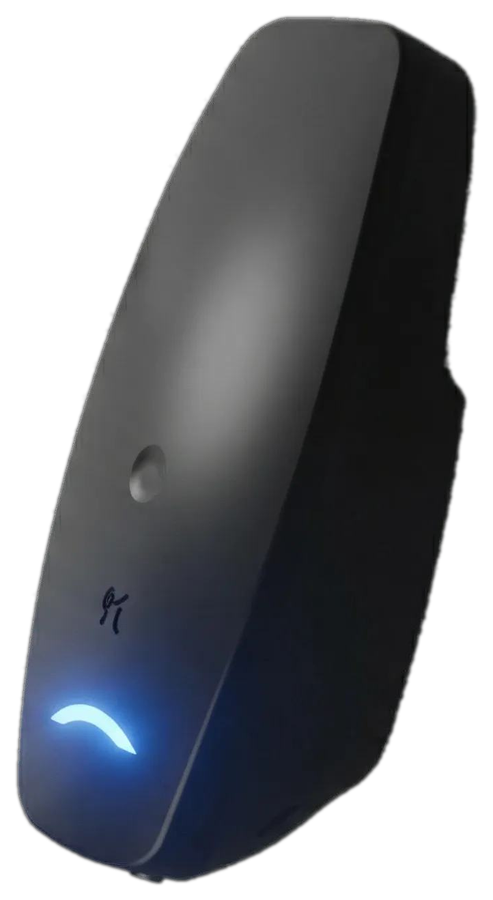
| 1 | Rysflo Device | Handheld breath analysis device used to perform breath measurements. |
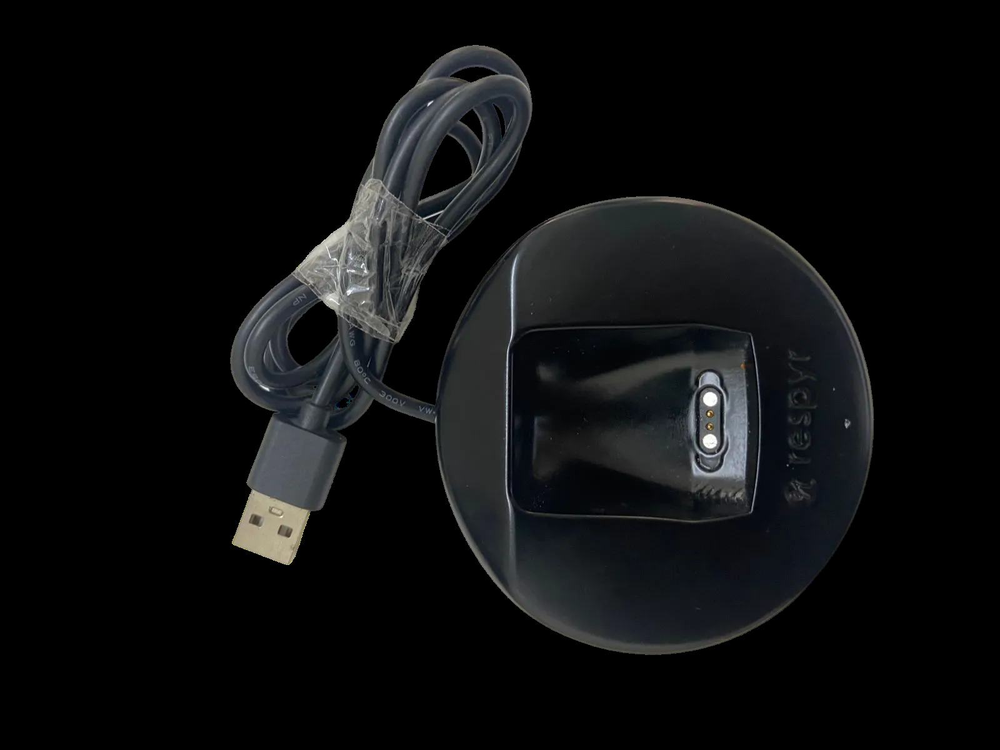
| 2 | Charging Dock with Cable | Used to safely charge the Rysflo device. |
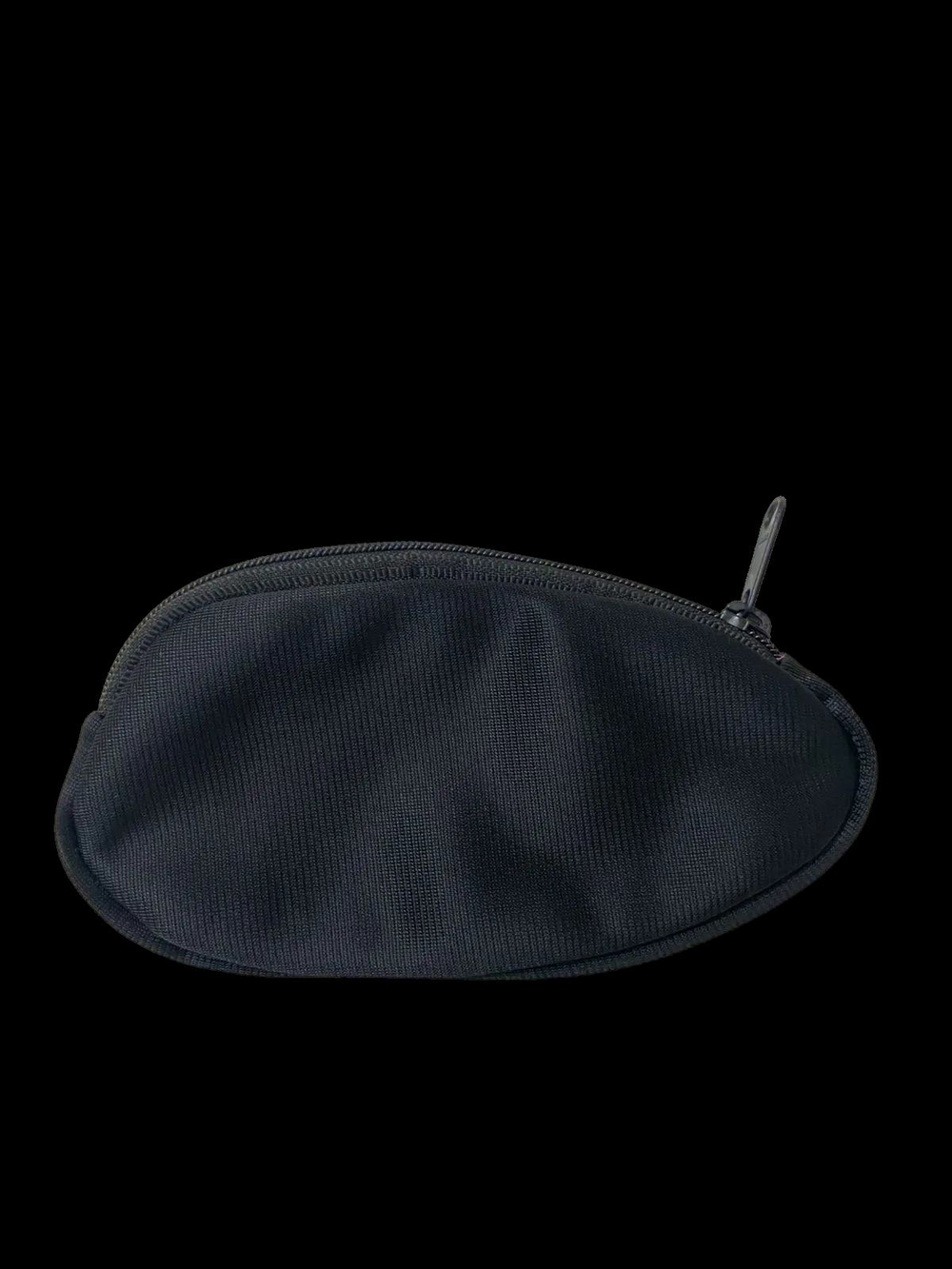
| 3 | Travel Pouch | Used to safely store and carry the Rysflo device. |
| 4 | Rysflo App Start Guide | Card containing QR codes to download the Rysflo mobile application and the Instructions for Use (IFU). |
Device Description
Rysflo™ is a handheld electronic device designed to analyze exhaled breath and provide metabolic wellness insights through the Rysflo mobile application. It measures specific volatile organic compounds (VOCs) present in exhaled breath.
Measured Breath Biomarkers
| Biomarker | Description |
|---|---|
| Acetone | Associated with fat metabolism and energy utilization. |
| Ethanol | Associated with metabolic and biochemical processes in the body. |
| Hydrogen | Associated with digestive activity and gut-related metabolic processes. |
How It Works
- Rysflo measures the concentration patterns of these breath biomarkers using integrated sensors.
- The device transmits the breath data to the Rysflo mobile application via Bluetooth.
- The application processes the data and presents your metabolic wellness insights.
Device Dimensions and Weight
| Device Height | 111 mm |
| Device Width | 44 mm |
| Device Weight | 86 g |
| Dock Cable Length | 1 m |
| Dock Cable Weight | 63 g |
| Travel Pouch Size | 82 × 148 mm |
Intended Use and User Population
Rysflo™ is intended for use by healthy adults seeking to monitor metabolic wellness through breath analysis. The device is designed for personal, non-clinical, indoor use only.
| Intended User | Healthy adults (18 years and above) for personal wellness monitoring. Personal wellness |
| Not intended for | Children, individuals with respiratory conditions, or for clinical diagnostic purposes. This device is not a medical device and does not provide medical diagnoses. Not a medical device |
Device Components
Power Button
Used to switch the Rysflo device ON or OFF, and to reset the device.
Breath Inlet
Opening where the user exhales breath into the device during measurement.
LED Indicator
Displays device status such as power, connection, measurement, battery level, and error conditions.
Charging Contacts
Located at the bottom of the device, used to charge the device through the charging dock.
Air Exhaust Vent
Allows airflow to exit the device during operation. Do not block this vent.
Power Button
Used to switch the Rysflo device ON and OFF, and to reset the device.
Breath Inlet
Opening where the user exhales breath into the device during measurement.
LED Indicator
Displays device status such as power, connection, measurement, battery level, and error conditions.
Air Exhaust Vent
Allows airflow to exit the device during operation. Do not block this vent.
Charging Contacts
Located at the bottom of the device — used to charge the device through the charging dock.
LED Indicator Guide
Rysflo™ uses LED lights to indicate device status and operating conditions. The LED color and behavior tell you what the device is doing at a glance.
Device LED Indicators
| LED Color | Behavior | Device Status | Description |
|---|---|---|---|
| Blue | Solid | Device Power ON | Appears when the device switches ON. The device is starting and ready for operation. |
| Green | Blinks ×2, then solid | Connected to Rysflo App | The device is successfully connected to the Rysflo mobile app and is ready to start. |
| Blue | Solid | Measurement in Progress | The device is performing a breath measurement. |
| Blue | Breathing | Charging in Progress | The device is on the dock and charging. Battery is filling. |
| Green | Breathing | Charging — Almost Full | Charging is nearly complete; the device is finishing and verifying full charge. |
| Green | Solid | Fully Charged | The battery is fully charged and verified. |
| Red | Breathing (slow fade) | Low Battery | The battery level is low. Please charge the device soon. You can still finish the current test. |
| Red | Slow glow ON / OFF | Critical Battery Level | The battery is too low to operate. Immediate charging is required. |
| Red | Solid | Reading Failure | The breath reading was not successful. Follow the app instructions and retry. |
| Red | Solid | Device Fault or Error | A device fault or internal error. Restart the device; if it continues, contact support. |
Charging Dock Indicator
| Dock Light | Behavior | Charging Status | Description |
|---|---|---|---|
| Red Dot | Solid | Charging in Progress | Indicates that the Rysflo device is currently charging. |
| No Light | OFF | Fully Charged | Indicates that the device is fully charged. |
Battery and Charging Information
Rysflo™ contains a built-in rechargeable Nickel-Metal Hydride (NiMH) battery designed to support normal device operation.
Battery Specifications
| Battery Type | Rechargeable Nickel-Metal Hydride (NiMH) |
| Battery Configuration | 2-cell battery pack |
| Battery Capacity | 750 mAh |
| Nominal Voltage | 2.4 V DC |
| Charging Method | Charging dock with attached cable |
| Charging Input | 5 V DC via charging dock |
| Charging Time | Couple of hours |
| Battery Replacement | Battery is not user-replaceable |
Charging Adapter Requirements
Use a compatible USB power adapter that meets the following requirements.
| Power Source | USB power adapter |
| Output Voltage | 5 V DC |
| Output Current | 2 A |
| Safety Certification | Adapter should preferably be UL certified or equivalent safety certified |
| Charging Dock | Use only the charging dock and cable supplied by Humors Tech Pvt. Ltd. |
Charging Safety Instructions
- Use only the provided charging dock and cable supplied by Humors Tech Pvt. Ltd.
- Use a USB power adapter that is preferably UL certified or safety certified.
- Do not use the device while it is placed in the charging dock.
- Always remove the device from the charging dock before performing a breath measurement.
- Do not use damaged charging adapters or cables.
- Charge the device indoors in a dry and safe environment.
Battery Status Indicator
Rysflo™ indicates battery status through both the device LED indicator and the Rysflo mobile application.
Device Battery Status Indicators
| LED Color | Behavior | Battery Status | Description / User Action |
|---|---|---|---|
| Red | Breathing (slow fade) | Low Battery | Battery is getting low. The device still operates. Charge the device soon. |
| Red | Slow glow ON / OFF | Critical Battery Level | Battery extremely low. Breath measurement is not allowed. Charge immediately. |
| No Red Light | Normal operation | Sufficient Battery | Battery is sufficient for normal operation. No action required. |
Mobile Application Battery Status Indicator
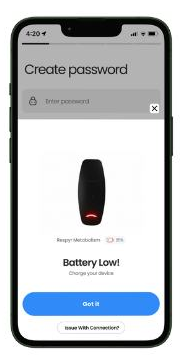
| App Indicator | Battery Status | Description | User Action |
|---|---|---|---|
| Popup message "Low Battery — Charging Required" |
Critical Battery Level | When the battery becomes extremely low, the Rysflo mobile application displays a popup message. The application will not allow the user to perform a breath measurement until the device is charged. | Charge the device using the charging dock before performing a reading. |
Charging Procedure
Rysflo™ must be charged using the provided charging dock and cable connected to a compatible USB power adapter. Fully charge the device before first use, or after one month or more of inactivity, to ensure optimal performance.
Steps to Charge the Rysflo Device
- 1Connect the charging dock cable to a USB power adapter (5 V DC, minimum 2 A).
- 2Plug the USB power adapter into a power outlet.
- 3Place the Rysflo device into the charging dock properly.
- 4Ensure the device is seated correctly in the dock.
- 5Verify that the Red Dot indicator on the dock turns ON, indicating charging has started.
- 6Allow the device to charge until the dock indicator light turns OFF, indicating full charge.
Automatic Power ON on the Dock
- When you place the device on the charging dock, it automatically switches ON.
- The device LED indicates the charging state: Blue breathing while charging, Green breathing when almost full, and Solid Green when fully charged.
- You can connect the Rysflo mobile app while the device is charging to check the battery level.
- When you remove (undock) the device, it automatically returns to idle/standby mode.
How to Perform a Breath Test
Rysflo™ performs breath measurements through guided instructions provided in the Rysflo mobile application.
Before Performing the Test
| Indoor Ventilated Environment | Perform the test in a clean, indoor, and well-ventilated environment. |
| Charge Device | Ensure the Rysflo device has sufficient battery before performing the test. |
| Install and Open App | Install and open the Rysflo mobile application using the QR code provided in the Rysflo App Start Guide. |
| Enable Bluetooth | Ensure Bluetooth is enabled on your mobile device. |
| Sit and Relax | Sit in one place for 5–10 minutes and relax before starting the breath test. |
Steps to Perform the Breath Test
- 1Press the power button (short press) to switch ON the Rysflo device.
- 2Verify that the Blue LED appears, indicating the device is powered ON.
- 3Open the Rysflo mobile application.
- 4Connect the Rysflo device to the mobile application via Bluetooth.
- 5Follow the breathing instructions displayed in the mobile application.
- 6Exhale into the Rysflo device as instructed by the application.
- 7Keep the device steady during the measurement.
- 8Wait for the measurement to complete and view the results in the mobile application.
Power Management & Measurement Tips
Rysflo™ manages its power automatically to conserve battery between measurements.
Automatic Power OFF
| After Measurement | The Rysflo device automatically switches OFF after completing the breath measurement. |
| No App Connection (30 seconds) | If the device is not connected to the Rysflo mobile application within 30 seconds of being powered ON, it automatically enters idle/standby mode to conserve battery. |
Manual Reset and Power Control
| Power ON | Press the power button once (short press). The Blue LED will appear indicating the device is ON. |
| Hard Reset | Press and hold the power button for 2 seconds to reset the device. |
Important Instructions During Measurement
| Follow App Guidance | Always follow the breathing instructions provided in the mobile application. |
| Keep Device Steady | Do not move the device during measurement. |
| Do Not Block Air Vent | Ensure the air exhaust vent is not blocked. |
| Repeat if Needed | If a reading fails, follow the instructions in the app and repeat the test. |
Firmware Update (Over-the-Air)
Rysflo™ can update its device firmware wirelessly through the Rysflo mobile application. When an update is available, the app will recommend updating the device. Follow these steps:
- 1When the app recommends a firmware update, place the Rysflo device on the charging dock. The device must remain on the dock for the entire update.
- 2In the Rysflo app, press "Start Firmware Upgrade."
- 3The device enters update mode. The upgrade takes a few minutes — do not remove the device from the dock and do not close the app during this time.
- 4When the upgrade is complete, the device automatically reboots.
- 5The app displays a confirmation that the firmware upgrade was successful.
Safety Instructions and Warnings
Read and follow all safety instructions before using Rysflo™ to ensure safe and proper operation.
General Safety Instructions
| Intended Use | Use Rysflo only as described in this manual and the Rysflo mobile application. Not intended for persons with an existing medical condition (diabetes, metabolic disorder, lung disease) — consult your physician first. |
| Indoor Use Only | Use the device only in indoor environments. |
| Keep Device Dry | Do not expose the device to water, liquids, or excessive moisture. |
| Avoid Physical Damage | Do not drop, crush, or apply excessive force to the device. |
| Do Not Disassemble | Do not open or disassemble the device. There are no user-serviceable parts inside. |
Battery and Charging Safety
| Do Not Use While Charging | Do not use the device while it is placed in the charging dock. Charge only using the dock and cable provided by Humors Tech Pvt. Ltd. |
| Avoid Heat Exposure | Do not expose the device to high temperatures or direct sunlight. |
| Do Not Damage Battery | Do not puncture, crush, or expose the device to fire. |
| Non-Replaceable Battery | The Rysflo™ device contains a built-in rechargeable battery that is not user-replaceable. |
| Battery Service | If a significant reduction in battery runtime is observed over time, please contact Humors Tech Pvt. Ltd. for device service or replacement. |
| Do Not Attempt Replacement | Do not attempt to open the device or replace the battery yourself. This may damage the device and void the warranty. |
RF Exposure and Medical Device Interference
| Pacemakers | Maintain at least 15 cm (6 in) separation between Rysflo™ and a pacemaker or implanted device. |
| Other Medical Devices | Consult the device manufacturer or your physician to confirm adequate RF shielding before using Rysflo™. |
| RF Signals | Certain electronic equipment may not be shielded against RF signals emitted by Rysflo™'s Bluetooth module. |
Proper Use and Misuse Warning
| Mouthpiece Use Only | When performing a breath measurement, insert only the breath inlet into your mouth. Do not insert it into any other bodily orifice. |
| Do Not Use for Inhalation | Do not use Rysflo™ to inhale any substance, narcotic, vapor, or otherwise. It is intended only for normal exhaled-breath analysis. |
Device Handling, Storage & Support
Careful handling and storage keep your Rysflo™ device performing reliably.
Device Handling and Storage
| Proper Storage | Store the device in a clean and dry place. |
| Avoid Extreme Conditions | Do not expose the device to extreme temperature or humidity, or leave it in a parked vehicle for prolonged periods. |
| Use Travel Pouch | Use the provided travel pouch to protect the device during transport. |
Service and Support
| No User-Serviceable Parts | Do not attempt to repair the device yourself. |
| Contact Manufacturer | Contact Humors Tech Pvt. Ltd. support for any service or repair needs. |
Cleaning and Maintenance Instructions
Regular cleaning and proper maintenance help ensure safe operation and reliable performance of the Rysflo™ device.
Cleaning Instructions
| External Cleaning | Clean the outer surface of the Rysflo device using a soft, dry cloth. |
| Avoid Liquid Entry | Do not allow liquids to enter the breath inlet, air vent, or charging contacts. |
| Do Not Immerse | Do not immerse the device in water or any liquid. |
| Do Not Spray | Do not spray cleaning liquid onto the device. |
Maintenance Instructions
| No User-Serviceable Parts | The Rysflo device does not contain any user-serviceable parts. |
| Do Not Open Device | Do not open or attempt to disassemble the device. |
| Protect from Damage | Avoid dropping or exposing the device to physical impact. |
| Proper Storage | Store the device in a clean, dry environment when not in use. |
| Use Travel Pouch | Use the provided travel pouch to protect the device during transport and storage. |
Storage and Transport Instructions
Proper storage and transport of the Rysflo™ device help maintain device performance and extend its service life.
Storage Conditions
| Operating Temperature | 10 °C to 40 °C |
| Storage Temperature | 0 °C to 45 °C |
| Storage Humidity | Up to 90% non-condensing |
| Storage Environment | Clean, dry, indoor environment |
| Protection | Store the device in the provided travel pouch when not in use |
Storage Instructions
| Clean Before Storage | Ensure the device is clean and dry before storing. |
| Avoid Moisture | Do not store the device in humid or wet environments. |
| Avoid Direct Sunlight | Do not expose the device to direct sunlight for extended periods. |
| Avoid Extreme Temperatures | Do not store the device in extremely hot or cold locations. |
| Safe Placement | Store the device in a safe location to prevent accidental damage. |
Transport Instructions
| Use Travel Pouch | Always use the provided travel pouch during transport. |
| Avoid Physical Impact | Protect the device from drops, vibration, or mechanical shock. |
| Avoid Harsh Conditions | Do not expose the device to excessive heat, cold, or moisture during transport. |
| Power OFF During Transport | Ensure the device is switched OFF before transport. |
Manufacturer Information and Support
Rysflo™ is manufactured and supported by Humors Tech Pvt. Ltd.
Manufacturer Details
| Manufacturer Name | Humors Tech Pvt. Ltd. |
| Product Name | Rysflo Metabolism |
| Model | Rysflo 1.0 |
| Country of Manufacture | India |
| Intended Use | Breath-based metabolic wellness device for indoor use |
Customer Support
Service and Repair
| Authorized Service Only | Device service and repair must be performed only by Humors Tech Pvt. Ltd. or authorized personnel. |
| Do Not Attempt Repair | Do not attempt to open, repair, or modify the device. |
| Battery Service | If battery performance significantly decreases, contact Humors Tech Pvt. Ltd. for service or replacement. |
| Proper Use | Use the device only as described in this manual. |
| Safety Compliance | Follow all safety instructions to ensure safe and proper operation. |
FCC Compliance Statement
Rysflo™ Metabolism 1.0 has been tested and evaluated for compliance with the applicable requirements of Part 15 of the FCC Rules (47 CFR Part 15).
FCC Notice
This device complies with Part 15 of the FCC Rules. Operation is subject to the following two conditions: (1) this device may not cause harmful interference, and (2) this device must accept any interference received, including interference that may cause undesired operation.
Class B Digital Device Notice
This equipment has been tested and found to comply with the limits for a Class B digital device, pursuant to Part 15 of the FCC Rules. These limits are designed to provide reasonable protection against harmful interference in a residential installation. This equipment generates, uses, and can radiate radio frequency energy and, if not installed and used in accordance with the instructions, may cause harmful interference to radio communications. However, there is no guarantee that interference will not occur in a particular installation. If this equipment does cause harmful interference to radio or television reception, which can be determined by turning the equipment off and on, the user is encouraged to try to correct the interference by one or more of the following measures:
- Reorient or relocate the receiving antenna.
- Increase the separation between the equipment and receiver.
- Connect the equipment into an outlet on a circuit different from that to which the receiver is connected.
- Consult the dealer or an experienced radio/TV technician for help.
Radio Module Certification
Environmental Compliance
| RoHS | Rysflo™ Metabolism 1.0 is assembled using components that comply with the Restriction of Hazardous Substances (RoHS) requirements, which restrict the use of lead, mercury, cadmium, and other designated hazardous substances in electronic equipment. |
| WEEE | Rysflo™ Metabolism 1.0 and its packaging carry the WEEE (Waste Electrical and Electronic Equipment) marking. It means the device must be disposed of through designated e-waste points, not household waste. |
Symbols and Markings
| Marking | Meaning |
|---|---|
| Recycling Symbol | Indicates that the packaging materials are recyclable. |
| WEEE Symbol | Do not dispose of with household waste — recycle via designated e-waste collection points (WEEE Directive). |
Troubleshooting, Warranty, Return and Refund Policy
For troubleshooting assistance, warranty information, return policy, and refund policy, please refer to the official Rysflo support pages available online. These pages provide the latest and most accurate information regarding device usage, support, service, and applicable policies.
Device Symbols
The following symbols may appear on the Rysflo™ device, packaging, or accompanying documentation.
| Symbol | Name | Meaning |
|---|---|---|
 | Serial Number (SN) | Identifies the product's unique serial number. |
 | Manufacturer | Indicates the legal manufacturer of the device. |
 | Disposal (WEEE) | Device must not be disposed of with household waste — recycle through designated e-waste collection points (WEEE Directive). See the FCC Compliance section for details. |
| Ni-MH | Battery Chemistry (Ni-MH) | Indicates the battery type used in the device — Nickel-Metal Hydride (Ni-MH) — for recycling and safety identification. |
 | Direct Current (DC) Input | Indicates the device and dock operate on direct current (DC) power, as shown next to the input power rating on the dock label. |
Safety Warnings and Cautions
Read all warnings and cautions before using the Rysflo™ device. Failure to observe these notices may result in injury or device damage.
Copyright Notice and Trademarks
© 2026 Humors Tech Pvt. Ltd. All rights reserved.
Rysflo™ and the Rysflo logo are trademarks of Humors Tech Pvt. Ltd., pending registration in the U.S.
No part of this document may be reproduced, distributed, transmitted, or stored in any form or by any means, electronic, mechanical, photocopying, recording, or otherwise, without prior written permission from Humors Tech Pvt. Ltd.
Humors Tech Pvt. Ltd. reserves the right to make changes to the product and this document without prior notice.
Manufacturer Responsibility and Disclaimer
Humors Tech Pvt. Ltd. is responsible for the safety, performance, and reliability of the Rysflo™ device only if:
- The device is used in accordance with the instructions provided in this manual.
- The device is not modified, altered, or repaired by unauthorized personnel.
- Only approved accessories and charging components are used.
Humors Tech Pvt. Ltd. shall not be liable for any damage, malfunction, or injury resulting from:
- Improper use of the device
- Use outside the specified operating conditions
- Unauthorized modification or repair
- Use of unapproved accessories or charging equipment